

Zones
Zone Management Guide
Guide for creating and configuring zones in CyberOptix.
Overview
Zones organize subnets and URLs into logical groups for automated security testing. Each zone is managed by a scanner group that performs discovery, vulnerability scanning, and monitoring based on configured schedules.
Zone Components:
- Subnets: Network ranges to scan (CIDR notation)
- URLs: Web applications to test
- Scanner Group: Scanners that perform testing
- Scan Schedules: Frequency for different scan types
- Nmap Parameters: Custom scanning configurations
Prerequisites
- Organization configured in CyberOptix
- Subnets and/or URLs added to the organization
- Scanner group created and scanners linked
- Appropriate Nmap parameters configured (optional)
Create Zone
Step 1: Open Add Zone Form
Click the Add icon in the Zones section.
Step 2: Configure Zone Details
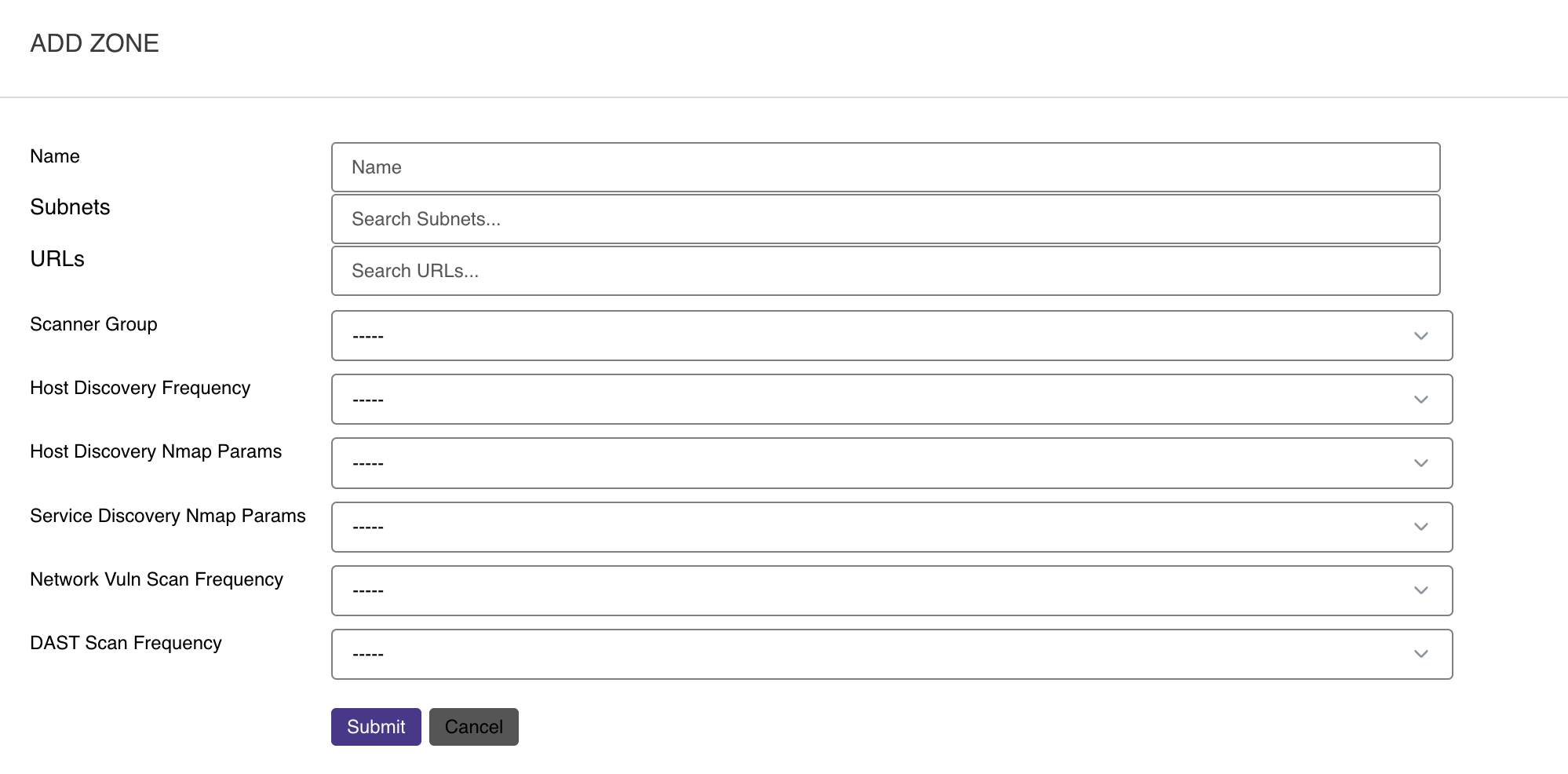
Complete the zone configuration:
- Zone Name - Descriptive name for the zone
- Subnets - Select network ranges to include
- URLs - Select web applications to include
- Scanner Group - Choose which scanners will perform testing
- Scan Frequencies - Set schedules for different scan types
- Nmap Parameters - Select scanning configuration
- Blackout Dates - Specify dates when scans should not run (optional)
- Recurring Blackout Dates - Define repeating blackout periods (optional)
Step 3: Submit
Click Submit to create the zone.
Zone Configuration Options
Scan Frequencies
Configure how often different scan types run:
| Scan Type | Recommended Frequency | Purpose |
|---|---|---|
| Discovery | Daily or Weekly | Identify new hosts and services |
| Vulnerability Scan | Weekly or Monthly | Detect security vulnerabilities |
| Web Application Scan | Weekly or Monthly | Test web apps for OWASP Top 10 |
| Port Scan | Daily or Weekly | Monitor service changes |
Nmap Parameters
Select pre-configured Nmap parameter sets or create custom parameters:
Default Parameter Sets:
- Standard: Balanced speed and accuracy
- Aggressive: Comprehensive but slower scanning
- Stealth: Low detection probability
- Quick: Fast discovery, minimal probing
Custom Parameters:
Create custom Nmap parameters in Administration → Parameters if default sets don't meet your requirements.
Blackout Dates
Prevent scans from running on specific dates to avoid conflicts with:
- Scheduled maintenance windows
- High-traffic business periods (Black Friday, tax season)
- System upgrades or migrations
- Regulatory compliance periods
- Company events or releases
Configuration:
- Select specific dates when scans should not execute
- Add multiple blackout dates as needed
- Blackout dates apply to all scan types in the zone
Example Use Cases:
- December 24-26: Holiday shutdown
- First Monday of each quarter: Maintenance window
- Product launch dates: Avoid scanning during critical events
Recurring Blackout Dates
Define repeating patterns when scans should not run:
| Pattern | Example | Use Case |
|---|---|---|
| Daily | Every day 9 AM - 5 PM | Business hours |
| Weekly | Every Saturday-Sunday | Weekend production freeze |
| Monthly | First weekend of month | Monthly maintenance |
| Yearly | December 25 | Annual holidays |
Common Recurring Blackouts:
- Business Hours: Prevent scans during peak usage (9 AM - 5 PM weekdays)
- Weekends: Avoid scanning during change freeze periods
- Monthly Maintenance: Regular maintenance windows (1st Saturday monthly)
- Holidays: Company-wide holidays and observances
- Quarter End: Prevent scans during financial close periods
Configuration Examples:
Weekday Business Hours:
  Pattern: Daily
  Time: 09:00 - 17:00
  Days: Monday - Friday

Weekend Freeze:
  Pattern: Weekly
  Days: Saturday, Sunday
  All Day: Yes

Monthly Maintenance:
  Pattern: Monthly
  Week: First
  Day: Saturday
  Time: 00:00 - 06:00
Zone Organization Strategies
By Network Segment
Organize zones by network architecture:
Example:
- DMZ Zone: Public-facing servers and applications
- Internal Zone: Internal corporate network
- Management Zone: Infrastructure and admin systems
- Guest Zone: Guest WiFi and visitor networks
By Business Function
Organize zones by application or team:
Example:
- E-Commerce Zone: Online store infrastructure
- API Zone: API endpoints and microservices
- Database Zone: Database servers
- Development Zone: Dev and staging environments
By Cloud Provider
Organize zones by cloud platform:
Example:
- AWS-Production: Production AWS resources
- Azure-Development: Development Azure resources
- GCP-Analytics: Google Cloud analytics platform
Zone Management
Add Subnets or URLs to Existing Zone
- Navigate to the zone
- Click Edit
- Select additional subnets or URLs
- Click Update
Change Scanner Group
- Navigate to the zone
- Click Edit
- Select different scanner group
- Click Update
Scanners in the new group will begin testing according to the zone's schedule.
Modify Scan Frequency
- Navigate to the zone
- Click Edit
- Adjust scan frequency settings
- Click Update
Changes take effect at the next scheduled scan interval.
Update Nmap Parameters
- Navigate to the zone
- Click Edit
- Select different Nmap parameter set
- Click Update
New parameters apply to subsequent scans.
Manage Blackout Dates
Add Blackout Date:
- Navigate to the zone
- Click Edit
- Add specific date or recurring pattern
- Click Update
Remove Blackout Date:
- Navigate to the zone
- Click Edit
- Remove blackout date entry
- Click Update
Blackout dates take effect immediately and prevent scheduled scans from executing.
Subnet and URL Scope
Subnet Scope
When a zone includes subnets:
- Scanners perform host discovery across the entire CIDR range
- Active services are identified and catalogued
- Vulnerability scans run against discovered hosts
- New hosts are automatically added to asset inventory
URL Scope
When a zone includes URLs:
- Web application scanning (DAST) is performed
- OWASP Top 10 vulnerabilities are tested
- SSL/TLS configuration is analyzed
- Content discovery is performed
Combined Scope
Zones can include both subnets and URLs:
- Network-level scanning for infrastructure
- Application-level scanning for web apps
- Comprehensive coverage of the attack surface
Best Practices
Zone Naming:
- Use descriptive names that indicate purpose or location
- Include environment indicators (prod, dev, staging)
- Maintain consistent naming conventions
Scope Definition:
- Start with narrow scopes and expand gradually
- Separate production from non-production environments
- Verify authorization for all included assets
Scanner Assignment:
- Match scanner location to network segment
- Use multiple scanners in a group for redundancy
- Ensure scanners can reach all zone assets
Scan Scheduling:
- Schedule intensive scans during maintenance windows
- Stagger scan times across zones to distribute load
- Adjust frequency based on asset criticality
- Use blackout dates to prevent scans during critical periods
Blackout Management:
- Configure business hours blackouts to avoid production impact
- Add recurring blackouts for regular maintenance windows
- Set specific blackout dates for planned events and releases
- Review and update blackout dates quarterly
- Document blackout rationale for audit purposes
Nmap Configuration:
- Use standard parameters for most environments
- Configure stealth parameters for sensitive networks
- Test custom parameters before production use
Regular Review:
- Audit zone configurations quarterly
- Remove decommissioned assets
- Update scan frequencies based on change rate
- Verify scanner group assignments remain appropriate
Example Zone Configurations
Production Web Zone
Name: Production-Web-Apps
Subnets: None
URLs:
  - https://app.example.com
  - https://api.example.com
  - https://www.example.com
Scanner Group: DMZ-Scanners
Discovery Frequency: Daily
Vulnerability Scan: Weekly
Nmap Parameters: Standard
Recurring Blackout: Monday-Friday 09:00-17:00 (Business Hours)
Blackout Dates:
  - December 24-26 (Holiday)
  - Black Friday (Nov 24)
Internal Network Zone
Name: Corporate-Internal
Subnets:
  - 10.0.0.0/16
  - 172.16.0.0/24
URLs: None
Scanner Group: Internal-Scanners
Discovery Frequency: Daily
Vulnerability Scan: Monthly
Nmap Parameters: Aggressive
Recurring Blackout: First Saturday monthly 00:00-06:00 (Maintenance)
Blackout Dates: None
Cloud Infrastructure Zone
Name: AWS-Production
Subnets:
  - 10.100.0.0/16 (VPC CIDR)
URLs:
  - https://app.cloud.example.com
Scanner Group: Cloud-Scanners
Discovery Frequency: Weekly
Vulnerability Scan: Bi-Weekly
Nmap Parameters: Standard
Recurring Blackout: Saturday-Sunday (Change Freeze)
Blackout Dates:
  - Q1 Close: March 31
  - Q2 Close: June 30
  - Q3 Close: September 30
  - Q4 Close: December 31
Updated 12 months ago